> ## Documentation Index
> Fetch the complete documentation index at: https://autorender.io/docs/llms.txt
> Use this file to discover all available pages before exploring further.
# Exposure
> Apply a camera-style exposure shift to correct under- or overexposed images with the e_exposure token.
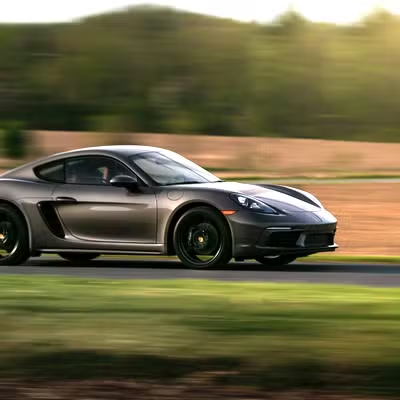
Exposure applies a camera-style light adjustment to the whole image, the way turning an exposure dial would. Use it to correct shots that came out too dark or too bright.
Add the `e_exposure` token to the transform segment of any delivery URL:
```bash theme={null}
https://assets.autorender.io/LOKVTtKVGb/e_exposure:25/docs/example/porsche.jpg
```
 ## How does it work?
`e_exposure:{level}` takes a level from **−100 to 100**. Negative values underexpose (darker), positive values overexpose (brighter), and `0` leaves the image unchanged.
Exposure and [brightness](/docs/transformations/effects/brightness) both change how light the image looks. Exposure mimics a camera's exposure setting across the tonal range, so it tends to hold detail in highlights and shadows better than a flat brightness shift.
## When to use it
* Correct images that are under- or overexposed.
* Reproduce a camera exposure adjustment in post.
* Brighten faces in backlit portraits.
* Recover detail in landscape shots.
## How do you combine it with other effects?
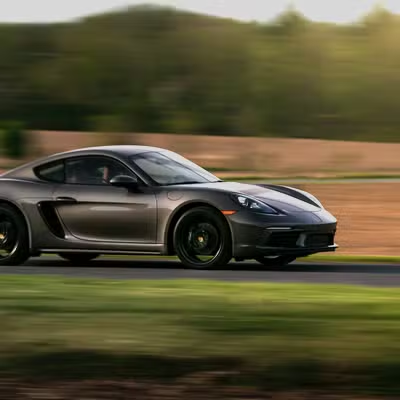
Chain exposure with highlights and shadows for finer control over specific tonal ranges. We recommend levels between **15 and 30**, because larger shifts clip the brightest and darkest areas (e.g. `e_exposure:20`).
```bash theme={null}
https://assets.autorender.io/LOKVTtKVGb/e_exposure:20,e_highlights:-30,e_shadows:25/docs/example/porsche.jpg
```
## How does it work?
`e_exposure:{level}` takes a level from **−100 to 100**. Negative values underexpose (darker), positive values overexpose (brighter), and `0` leaves the image unchanged.
Exposure and [brightness](/docs/transformations/effects/brightness) both change how light the image looks. Exposure mimics a camera's exposure setting across the tonal range, so it tends to hold detail in highlights and shadows better than a flat brightness shift.
## When to use it
* Correct images that are under- or overexposed.
* Reproduce a camera exposure adjustment in post.
* Brighten faces in backlit portraits.
* Recover detail in landscape shots.
## How do you combine it with other effects?
Chain exposure with highlights and shadows for finer control over specific tonal ranges. We recommend levels between **15 and 30**, because larger shifts clip the brightest and darkest areas (e.g. `e_exposure:20`).
```bash theme={null}
https://assets.autorender.io/LOKVTtKVGb/e_exposure:20,e_highlights:-30,e_shadows:25/docs/example/porsche.jpg
```
 ## Next steps
Lighten or darken the whole frame with `e_brightness`.
Widen or narrow the gap between light and dark areas with `e_contrast`.
Browse every effect token and how they combine.
See every transform parameter for images and video.
## Next steps
Lighten or darken the whole frame with `e_brightness`.
Widen or narrow the gap between light and dark areas with `e_contrast`.
Browse every effect token and how they combine.
See every transform parameter for images and video.